MASSAGE · SPA · WELLNESS

Software for massageand spas

Manage treatment bookings, client messages and sales in one app. Clients choose a time online, and you see the day's plans in your calendar.

  • Start with a calendar and online booking.
  • Add other tools when you need them.
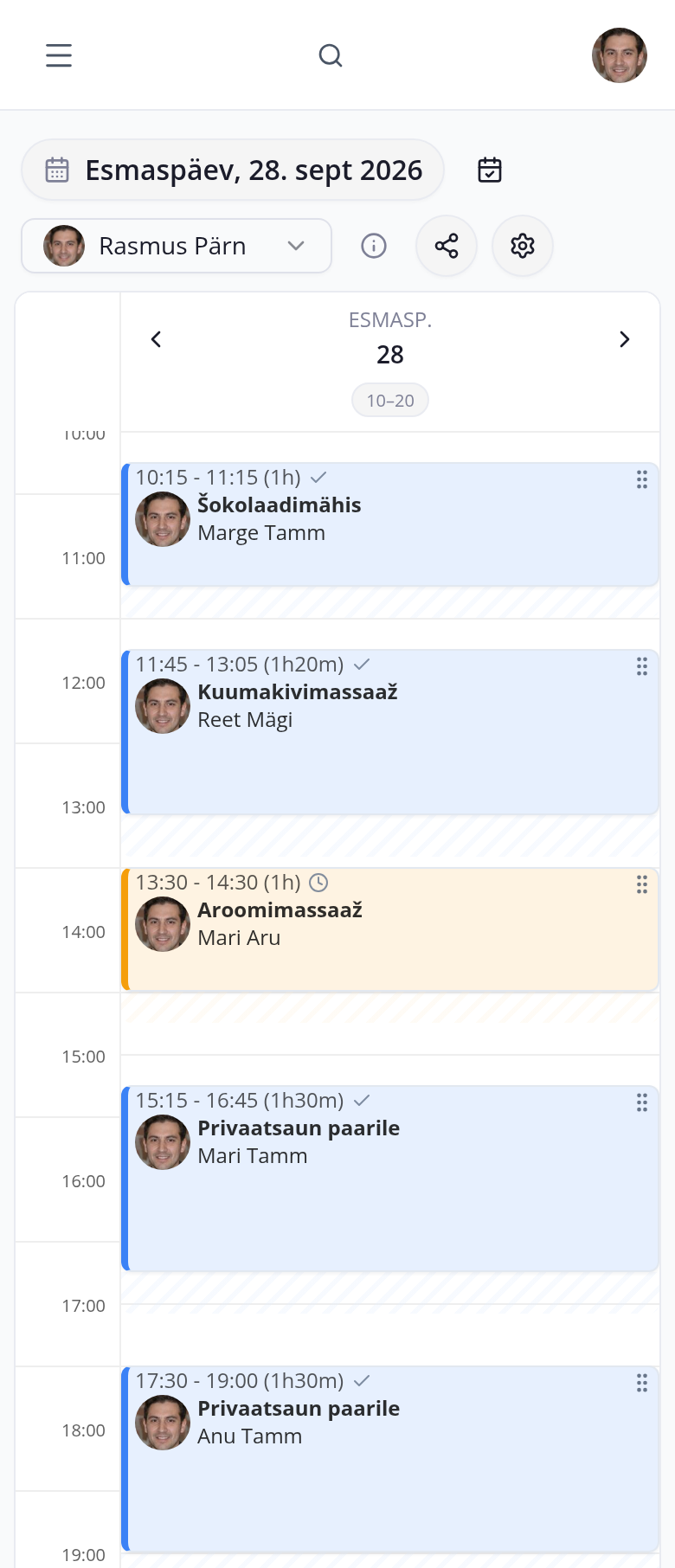
broneerimine.ee calendar on a phone: a massage therapist's day, chocolate wrap at 10:15, hot stone massage at 11:45 and aroma massage at 13:30
broneerimine.ee/sinu-spaa/admin
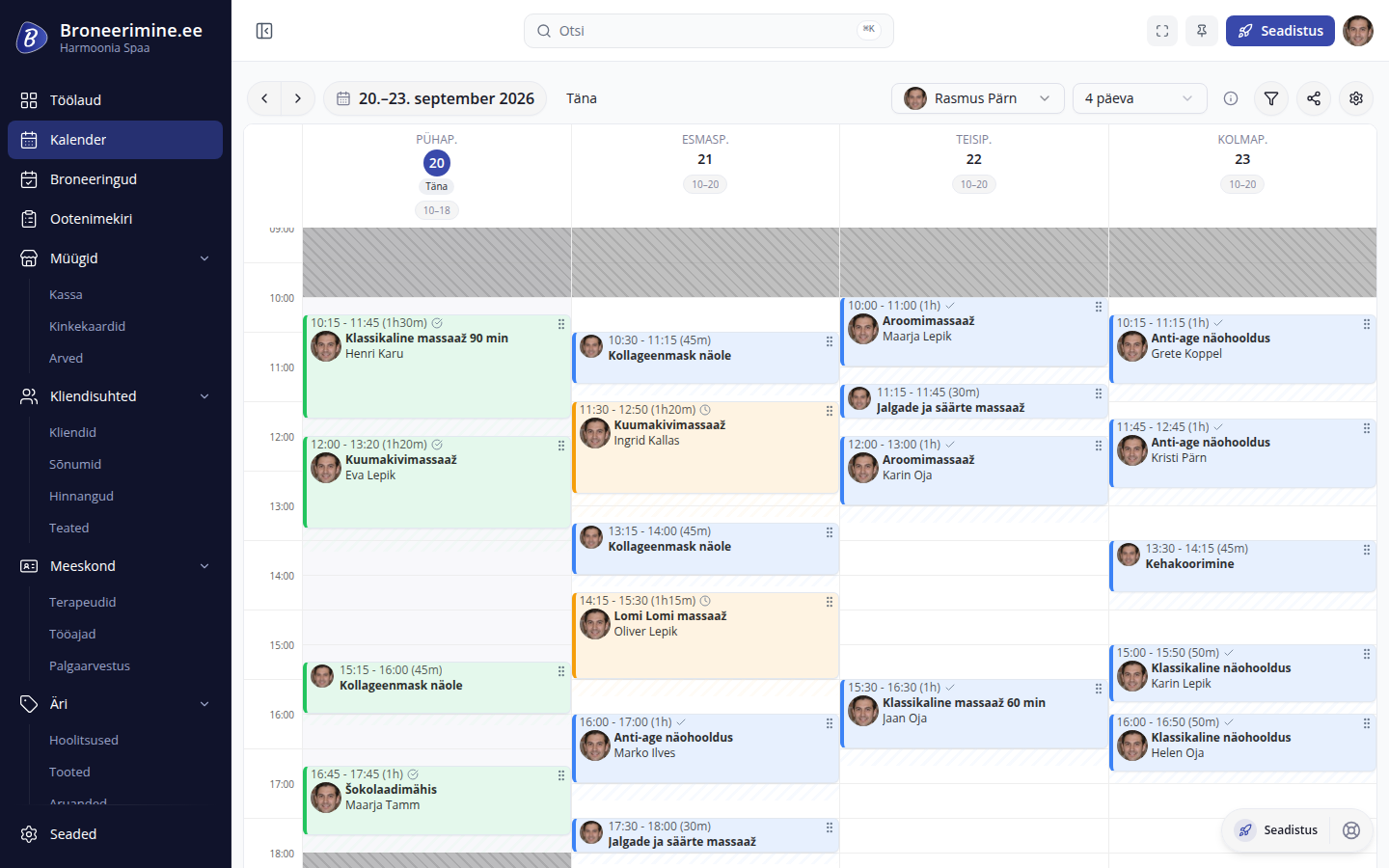
Harmoonia Spaa calendar: four days of massages and facials with buffer time

Offer a private sauna or self-service room?Connect bookings to the door lock and sauna controller so clients can enter at the agreed time.

See device connections

Clients choose their own treatment time

Your booking page shows treatment prices, durations and available times. Clients can book even while you are with someone else.

Also:

  • send automatic email reminders to clients
  • take an upfront payment through the spa's payment provider when clients book

1 / 5

BUFFER TIME

Leave time between treatments to reset the room

After a massage, you need time to change the sheets and prepare the room for the next client. Add this as buffer time after the treatment.

Set how many minutes you need after each treatment. The app accounts for this when offering times, so the next client can book after the buffer ends.

Set the time needed after treatment

  • Classic massage 60 min15 min
  • Hot stone massage 80 min20 min
  • Classic facial 50 min10 min
SaveClients see the next available times

Your calendar

Wednesday · Kadri Kask

  • 13.00–14.00Classic massage 60 min
  • 14.00–14.15Buffer: changing sheets

Client's time selection

Wednesday · available times

  • 9.00
  • 10.15
  • 11.30
  • 14.15
  • 15.30
  • 16.45

The next treatment can be booked from 14.15.

Harmoonia Spaa

Buffer time is added to the treatment's duration. Set it to match the time you need to prepare the room.

See buffer settings

Before, during and after a visit

Booking details stay close at hand throughout the visit. Review the client's wishes before treatment, then complete the sale and ask for feedback afterwards.

  1. WHEN BOOKING

    Ask about preferences when clients book

    Add questions to the booking form for anything you need to know before treatment. Answers stay with the booking.

    Booking form questions help you prepare for treatment. Ask which area the client wants massaged or whether they prefer unscented oil.

    How to use it

    Choose questions that help you prepare before the client arrives.

    Read the answers in the booking before the appointment.

    In the bookingTriin KukkClassic massage 60 min · 24.09 at 13.00Has any massage oil irritated your skin before?Yes, please use unscented oil.Which area needs more attention?Shoulders and upper back.You choose which questions clients answer when booking.
  2. BEFORE TREATMENT

    Reminders go out automatically

    Choose how long before treatment to send the reminder. The app emails the client at your chosen time.

    Confirmation lets clients know their booking is made. The app also sends a reminder before the visit.

    Want to send texts too?

    You can also send an SMS reminder so clients have their treatment time in a text.

    EmailYour massage at Harmoonia SpaaHello, Triin!We look forward to seeing you on 24 September 2026 at 15.00.Classic massage 60 min · Kadri KaskHarmoonia Spaa Example reminder before treatment
  3. AFTER TREATMENT

    Massage and take-home cream in one sale

    Open the till from the booking and add any products the client buys. Settle the whole visit in one sale.

    Treatment details come from the booking. If clients buy cream or oil to take home, add it to the same sale.

    At closing time

    Check the sales history to see which treatments and products you sold that day.

    TillTriin KukkClassic massage 60 min55,00 €Body cream24,00 €Total79,00 €24.09 at 14.00
  4. AFTER THE VISIT

    Ask how the client found the treatment

    After the visit, clients receive an email asking for a review. Read their responses to see what went well.

    Enable review requests and the app emails clients after their visits. Read their responses later in the admin app.

    EmailHow was your massage?Hello, Triin!Please let us know how you found your treatment.Harmoonia SpaaLeave a review Example request after a visit

SALES AND PAY

Manage gift cards and calculate therapist pay

Accept gift cards for treatments at the till. The app calculates therapist commissions from the same sales for you to review at the end of the month.

  • See the gift card balance at every visit

    Issue a gift card at the till and find it later by number. When clients arrive for treatment, you can see how much is left on the card.

    Use part or all of the balance to pay. Any remaining amount stays on the card for the next visit.

    1. Issue a gift cardRecord the card and its value at the till.
    2. Find the card by numberWhen clients arrive, find the card and check its balance.
    3. Use the amount neededDeduct part or all of the balance.

    Each gift card also shows previous uses. You can cancel a card if needed.

  • The app calculates therapist commissions

    If you pay therapists a percentage of treatment or product sales, enter the agreed rates. The app calculates their commission after each sale.

    At month-end, payroll shows the commission earned by each therapist. Review the amounts before paying.

    1. Set commission ratesEnter the agreed treatment and sales commission for each therapist.
    2. Record till salesThe app calculates each therapist's commission on treatments and products.
    3. Review payrollSee the accumulated commission for each therapist in payroll.

    Set separate commission rates for treatments and products.

Harmoonia Spaa gift cards and commissions.

WAITLIST

Offer open treatment times to clients on the waitlist

Clients join the waitlist with their preferred treatment and times. When a slot opens up, the app finds a matching client and sends an offer.

  • Clients confirm the offered time

    Clients decide whether to book the time offered. Once they accept, the booking appears in your calendar.

    The waitlist shows who is still waiting, who has received an offer and who has confirmed.

    1. The app offersA matching client on the waitlist receives an offer for the open time.
    2. Client confirmsAccepting the offer adds the booking to your calendar.
    3. Unanswered offers move onIf the client does not respond, the next matching client gets the offer.

Harmoonia Spaa waitlist

Prepare your private sauna based on bookings

For private spas or saunas without a reception desk. Connect bookings to on-site devices so visit times control door access and the sauna heating schedule.

Booking confirmedPrivate sauna for two · 18.00–19.30

Once a booking is confirmed, the door lock and sauna controller receive the visit's start and end times. The devices can then prepare for the visit.

  1. Temporary access

    The lock allows access from 15 minutes before the visit until it ends.

  2. Heating or sauna controller

    The sauna controller receives a schedule based on the booking.

  3. Temperature and leak alerts

    Staff receive an alert if the temperature goes outside the set range or a sensor detects a leak.

Build a rota that suits your therapists

The team calendar shows when each therapist sees clients. The rota generator helps plan the month, accounting for workloads, holidays and requested days off.

  • Compare three rotas and choose one

    A rota needs to fit both spa opening hours and therapist availability. Enter each therapist's workload, holidays and requested days off.

    The app offers three rota options. Choose one, adjust it as needed and apply it as your therapists' working hours.

    1. Add therapists and workloadEnter each therapist's workload.
    2. Add holidays and requestsEnter holidays and each therapist's requested days off.
    3. Choose a rotaCompare three options and apply one as working hours.

    Give reception access to the calendar and keep finances visible only to the manager.

    Workload, holidays and requestsKadri Kaskfull-timeLiis Saarwants 16 Oct offfull-timeMaarja Mägifull-timeMarko Tammholiday 8–12 Octpart-timeGenerateThree rotas to choose fromOctober 2026BalancedRequests firstHours firstBalanced: all requests metThursdayFridayMonday8Kadri Kask10–20Maarja Mägi10–20Marko Tammholiday9Liis Saar10–20Kadri Kask10–20Marko Tammholiday12Kadri Kask10–18Maarja Mägi10–18Marko Tammholiday15Liis Saar10–20Maarja Mägi10–2016Kadri Kask10–20Maarja Mägi10–20Liis Saarrequest19Kadri Kask10–18Marko Tamm10–18

AI helps clients book and supports your daily work

AI assistants answer client questions and help arrange treatments. In the admin app, ask the assistant for a summary of bookings and working hours.

For clients seeking a treatment

Clients arrange a treatment in chat 

The assistant answers questions about treatments, prices and available times on your booking page. When clients find a time, it helps make the booking and asks them to confirm the details.

  1. Client:

    Could I book an hour's massage on the afternoon of 24 September?

  2. AI receptionist:

    Kadri Kask is available at 15.00. A classic massage lasts 60 minutes and costs 55 €.

Once the client confirms

Massage booked

Time
24 September 2026 · 15.00–16.00
Harmoonia Spaa

Treatments in the client's language

Clients can read about treatments and book in their preferred language. Translate treatment descriptions, therapist profiles and client messages.

What you get

  • Treatment names and descriptions in the client's language.
  • Translated therapist profiles.
  • A booking page in several languages.
  • Translated confirmations and reminders.

How to use it

Choose languages to suit the clients you welcome at your spa.

Once translations are ready, make the language available on your booking page.

Questions before treatment

Add booking form questions to help you prepare. Clients answer while booking, and you find their answers in the booking.

What you get

  • Use words your clients know when writing questions.
  • Clients answer while booking.
  • Read answers in the booking before treatment.

How to use it

Ask which area the client would like you to focus on during the massage.

You can prepare for their wishes before meeting.

Upfront payment

Clients can pay for treatment when booking. You choose the upfront payment terms for each treatment.

What you get

  • Choose full or partial upfront payment.
  • Clients pay through the spa's payment provider.
  • Payments go straight to your company account.

Getting started with online payments

For online payments you sign a contract with a payment service provider. We help you sign it and start taking online payments.

Smart-ID and Mobiil-ID

Ask clients to verify their identity with Smart-ID or Mobiil-ID before confirming a booking. You choose when to require it.

Oils, creams and gift sets

Add the oils, creams or gift sets you sell at your spa. Sell them alongside treatments at the till and check stock in the product list.

What you get

  • Group products into categories to find them at the till.
  • Check each product's stock level.
  • Add treatment and take-home products to one sale.

How to use it

Start with products clients can buy after treatment, so they are easy to find when taking payment.

Client reviews after treatment

Enable review requests and clients receive an email after their visit. Their responses appear in the spa admin app, so you can see how they found their treatment.

SMS reminders too

Send booking confirmations and treatment reminders by SMS. Clients then have the agreed time to hand in a text.

How to use it

Choose which messages to send by SMS. You can also use email for confirmations and reminders.

Accounting connection

Your spa's invoices and sales data go straight to your accounting software. Your accountant keeps working in their own program.

What goes over

You choose which data goes over. Invoices go when they are issued, with the same invoice number, and the day's till sales go as one summary after the day ends. When you mark an invoice paid, the payment goes too.

You can also download the data as a file and send it to your accountant.

Price

What will it cost your spa?

The monthly fee depends on how many therapists clients can book. Booking, client and treatment counts do not affect the fee.

Bookable therapists
Billing period

Basic

For a treatment calendar, booking page and waitlist.

Basic, 1 therapist:15 €/ month

excluding VAT · 1 therapist Pay annually: 12,50 € per month, 150 € per year

For treatment bookings

  • Public booking page and online booking
  • Calendar, working hours and rotas
  • Clients, past bookings and notes
  • Automatic email reminders
  • Waitlist and “Any therapist” option
  • Team calendar and access permissions
  • Client and booking import and export
  • Contact form on your booking page

Full

Buffer time and till

For buffer time, a till, gift cards and therapist commissions.

Full, 1 therapist:29 €/ month

excluding VAT · 1 therapist Pay annually: 24,17 € per month, 290 € per year

Everything in Basic, plus

  • Buffer time after each treatment
  • Till, products and gift cards
  • Commissions and payroll
  • Questions on the booking form
  • Booking page and client email translations
  • Post-visit reviews and reports
  • Identity verification with Smart-ID and Mobiil-ID
  • All AI modules
  • Online upfront payments through your spa's payment provider

30 days free on the Full plan. Choose your plan after the trial.

Try free for 30 days

Full includes 100–400 SMS credits a month in the price, depending on the number of employees. Extra credits and credits on Basic are bought separately.

Make your first treatments bookable online

Add treatments and therapists' working hours so the app can offer available times. Then review your booking page and share the link with clients.

Import existing clients and bookings from a spreadsheet. We help prepare the file and import your data.

Get help importing your data
  1. Create a company account

    Enter your company details and choose “Spa and wellness” as your business type.

  2. Add treatments and therapists

    Set treatment prices, durations and buffer times. Add therapists and their working hours.

  3. Share your booking page

    Put the link on Instagram or share it in Messenger. Add a booking widget to your website.

Questions before you start

Broneerimine.ee is an Estonian product. We reply in Estonian.

info@broneerimine.ee
Can I set buffer time for each treatment?

Yes. Set how many minutes you need to prepare the room after each treatment. The app reserves that time after the treatment and offers the next client a slot once the buffer ends.

What happens after the 30-day trial?

Choose a plan after the trial and continue with the same account. The trial lasts 30 days. See the pricing section for plans and prices.

Does the price depend on therapist count?

Yes, it depends on the therapists clients can book: 1, 2–3, 4–5, or 6 and more. The last band has a fixed price with unlimited therapists. Booking, client and treatment counts do not affect the price.

Can I sell a gift card and later use it to pay for treatment?

Yes. Issue a gift card at the till, then look it up by number when the client visits. Use part or all of the balance to pay for treatment. Any remaining amount stays on the card for the next visit.

Can clients book without an account?

Yes. They choose a treatment, a therapist or “Any therapist”, and a time. Then they enter their name, phone and email and answer any questions you have added.

Can I offer a booking page in Russian or English?

Yes. Add translations for treatments, therapist profiles, the booking page and client messages. Once ready, make the language available on your booking page.

How do I import existing clients?

Download client data from your current software and import the file here. We help review and prepare the file for import. You can export your data later too.

How do private sauna or self-service room connections work?

The booking is linked to the room’s lock, sauna controller and sensors. Once the booking is confirmed, the client gets temporary access and the controller receives a heating schedule. Staff receive alerts about temperature problems and leaks. See device connections

Create an accountand try it at your spa.